Video Coming Soon...
1: A Good First Program
You should have spent a good amount of time in Exercise 0 learning how to install Jupyter, run Jupyter, run the terminal, and work with both of them. If you haven't done that, then do not go on. You will not have a good time. This is the only time I'll start an exercise with a warning that you should not skip or get ahead of yourself.
Type the following text into a Jupyter cell:
print("Hello World!")
print("Hello Again")
print("I like typing this.")
print("This is fun.")
print('Yay! Printing.')
print("I'd much rather you 'not'.")
print('I "said" do not touch this.')
Your Jupyter cell should look something like this:
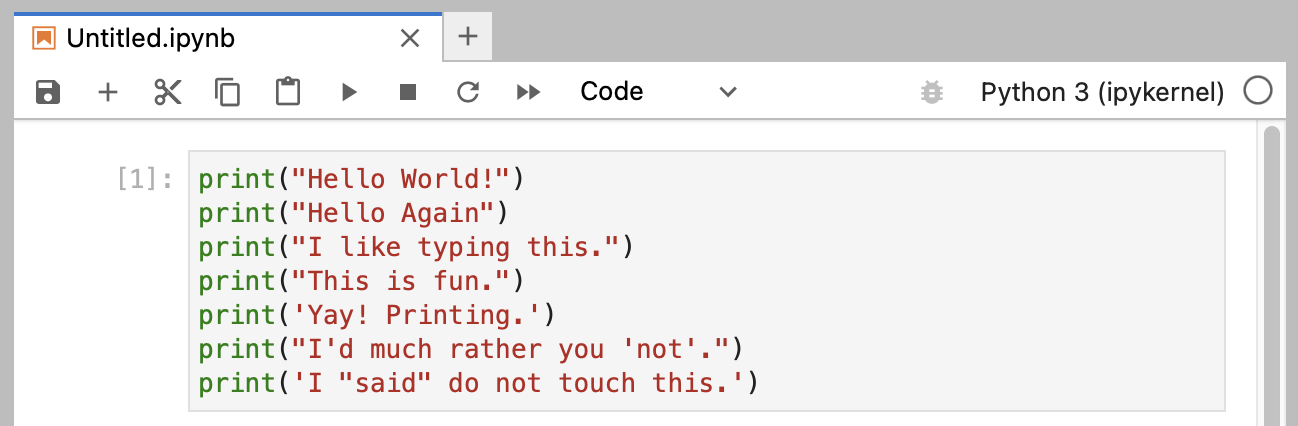
Don't worry if your Jupyter window doesn't look exactly the same; it should be close though. You may have a slightly different window header, maybe slightly different colors, and the left side of your Jupyter window won't be the same, but will instead show the directory you used for saving your files. All of those differences are fine.
When you create this cell, keep in mind these points:
- I did not type the line numbers on the left. Those are printed in the book so I can talk about specific lines by saying, "See line 5..." You do not type line numbers into Python scripts.
- I have the
printat the beginning of the line, and it looks exactly the same as what I have in in the cell. Exactly means exactly, not kind of sort of the same. Every single character has to match for it to work. Color doesn't matter, only the characters you type.
Once it is exactly the same, you can hit SHIFT-ENTER to run the code. If you did it right then you should see the same output as I in the What You Should See section of this exercise. If not, you have done something wrong. No, the computer is not wrong.
Register for Learn Python the Hard Way, 5th Edition (2023-2024)
Register today for the course and get the all currently available videos and lessons, plus all future modules for no extra charge.